 |
| Astra WordPress Theme: How to Add Rich Snippets |
These attractive star ratings are technically called rich snippets. In wordpress, integrating rich snippets to your website is super easy. You just need to put in some information in a plugin and search engines will index this information and you will get these rich snippets under your search engine rankings.
We have tried these schema snippets with astra theme. Astra is one of the best and high performing wordpress themes. You can know more about astra theme in this astra theme review. A lot of themes are there which are schema commpatible. So, almost every theme will be supporting schema ratings. Still if you are not sure about theme then you can try astra for free. So, firstly lets talk about what is scheme? here we go....
Also Read: https://www.digitaltechnology.institute/blog/why-chatbots-are-the-future-of-marketing/
What is Schema? How does it help?
Schema is a markup language. Schema is used to create rich snippets. Rich snippets are also called rich results. These are additions to a search results to google search results which are visible to users. There are various types of schema snippets. For example, see image below: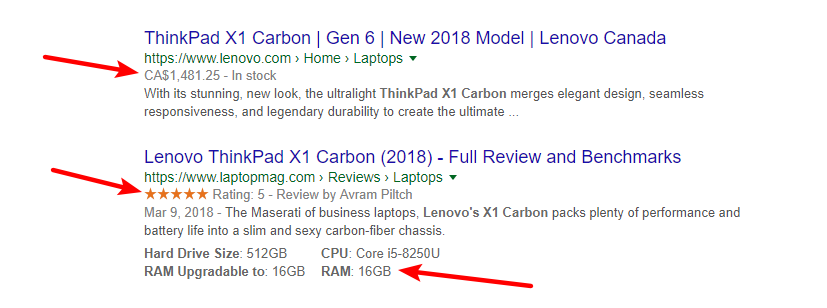
Schema snippets helps your website rankings look more helpful and attractive too. So, you will attract more and more customers.
How to Integrate Schema / Rich Snippets in Wordpress?
Here is a step by step tutorial on how to integrate rich snippets in your wordpress website. So, start with it now:1. Install All in One Schema Plugin on your wordpress website. Below we have shown this plugin in image:

2. Now open post editor, the post on which you want to put rich snippet. Now go to the bottom of editor and you will see this option:

Choose what type of schema you want to integrate and fill information in respective fields. Now update your post and you are done. Submit your website to google index and once it is indexed, you will be able to see rich snippet under your website results on google.
So, that's it for integrating rich snippet to your wordpress website. If you have any doubt or question then you can ask us in comments below. Thanks.
thanks for sharing this blog..
ReplyDeleteDigital marketing course in Delhi
Digital marketing course in Delhi
Coupondunia
Internet marketing
ecommerce website design
Faballey
cashless economy
best matrimonial site
Generate Leads
Digital Marketing Career
Thank you for sharing this informative post. looking forward to reading more.
ReplyDeleteBest WordPress Development Services